Showing posts with label All winner. Show all posts

Sunday, November 2, 2014

DOWNLOAD TWD_MID Allwinner A13 Single Cam Android Tablet PC Firmware


                                      Allwinner A13 TWD_MID Single Cam

Board ID :TW-A708 V50 0903
CP 5650 1232 RXS
Tablets Recovery , Tablet PC Restore , Android Tablet Upgrade Instructions

I have flash this tablet personally and firmware restore was successful with below mention firmware
TWD_MID Allwinner A13 Single Cam
TWD_MID 7 Inch
TWD_MID Allwinner A13 Single Cam 01

TWD_MID Allwinner A13 Single Cam 02
Board ID :TW-A708 V50 0903

TWD_MID Allwinner A13 Single Cam 03
Allwinner A13 Chipset

TWD_MID Allwinner A13 Single Cam 04
Flashing Done . Tablet working perfect
Short Review TWD_MID Android Tablet PC :
Allwinner TWD_MID Tablet  is 7 inch  Tablets . No brand found on tablet so I can call it Blank  Id tablet but inside Chipset is Allwinner A13. Carrying Android 4.0.4 TWD_MID is basic tablet with frontal cam , 1.2 Ghz processor ,512mb Ram along with capacitive touch . I have flash this tablet personally and firmware restore was successful with below mention firmware
 Encyclopedia:-

Read Article About Allwinner Technology 

Tablet PC Specifications:
Brand : Unknown
Model: TWD_MID
LCD                
7 inch Capacitive multi touch  Screen
Screen Resolution 
800 x 600 Pix
Processor 
 1.6 Ghz  
Chipset / Boxchip
 Allwinner 13
RAM
512 MB
Built in Memory
4 GB
External Memory
Support Micro Card  (upto 16 GB)
Wifi
802.11 b/g/n  supported
Bluetooth
available
Sim
 N/A
Camera
  0.3 Megapixel front                                    
HDMI /3g Dongle
 Support 3G Dongle
Microphone
Built IN 
Weight
285 g
Android Version
4.0.4
4 Hours Battery Time

Flashing Tutorials for Allwinner Tablets:
Recommended Tools for Common Tablet Issues: 
You can also use : Android Multi Tools

Common Android Tablets issues :

The following firmware , ROM file will be used  when your Android tablet facing various problems . 
1. Forgotten Pattern Lock on Android Tablets
2.Too many pattern attempts / Reset user lock.
3. Tablets PC stuck on Gmail account.
4. Android Tablet PC stuck on Android logo.
5. Tablet Android  hang on start-up / Multiple errors generating by OS. 
6. Google play store having problems or generating errors. 
7.Upgrading to new Android version.
you can use this Android Tablet firmware,  ROM to restore your Android China tablets to generic firmwares or upgrades . Make sure to charge battery upto 60%. Power failure during flashing may result dead or broken tablets.
Note : Flashing generic tablet firmware should be last option.
Android Tablets flashing manual All in one Here


1. Requirements:
(1) Windows PC
(2) USB Cable
(3) Upgrade tool (LiveSuit.exe)
(4) Firmware image file
(5) Windows USB drivers

2.Upgrade Steps:
(1) Unzip the upgrade tool and USB drive to your hard driver
Double-click the LiveSuitPack10x_english.exe file, it will automatically install the driver files. Click "OK" to complete the driver installation.

(2) Open LiveSuit.exe
Double-click to open the upgrade tool LiveSuit.exe

(3) Select the firmware
Click the "SelectImg" button (the first button from the left) to select the firmware .img file.

(4) Turn off your tablet

(5) Press the key combination to start it in the upgrade mode
a. Press the "Vol -" key, then press the "Power" button, hold two buttons at the same time
b. Connect the USB cable to tablet and computer
c. After connecting the USB cable, press the power button 6 times quickly or hold the "Vol -" keys and the "Power" button for more than 6 seconds (you should get a pop up window if done correctly , if not repeat step 5 from beginning)
d. DON'T release the "Vol -" button till the LiveSuit window pops up
e. You can now release the "Vol -" button
(Note: If you install the driver at this time the pop-up dialog box, the path to point to installation directory UsbDriver LiveSuit folder, click Next to complete the driver installation prompts).
You should see LiveSuit window pops up; otherwise, you didn't do it correctly, you have to repeat step 4 and 5.

(6) Select the format to force upgrade
Livesuit prompt "force format", click "Yes" (Y). All of the original apps installed will be removed.We highly recommend mandatory format! ! ! Otherwise the update is not complete and may brick! ! !

(7) Upgrade begins
Pop-up "OK to force format" dialog box, select "Yes", the upgrade begins.

(8) The upgrade is complete
Firmware download process last about three and a half minutes or so, please wait until the prompt "upgrade successful."

(9) Automatic restart
After the upgrade is complete, your tablet will automatically restart, then you can unplug the USB cable.
Slow start-up for the first time, please be patient.
If the machine does not restart automatically, press and hold the Power button for 8-10 seconds or more to ensure the power switch off, then press the Power button 3 seconds or more to turn on your tablet.

(10) Congratulations! You have flashed the firmware.

Tablet imei repair tools Free Download Here


Advance Tablet imei repair tools V1.0
supported allwinner A20 cpu
supported allwinner a10 cpu
supported allwinner a13 cpu
supported Mtk 6572,65xx cpu
suppotred allwinner 2g modem imei writing
supported allwinner 3g modem imei writing
Different imei writing tools for different modem version


note : All tools need usb debugging on

For any tablet imei repair


How to use :

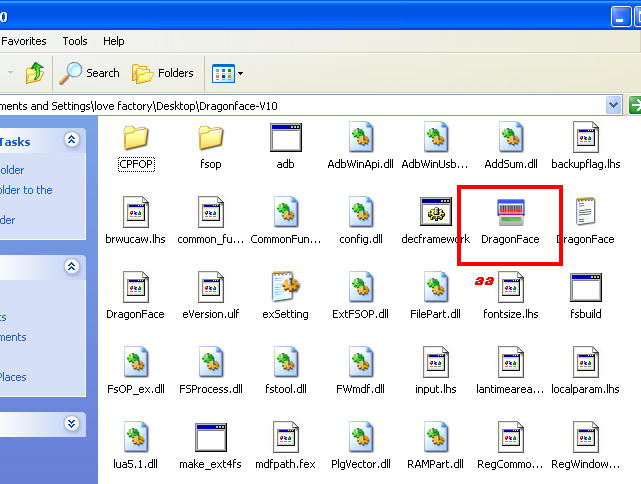
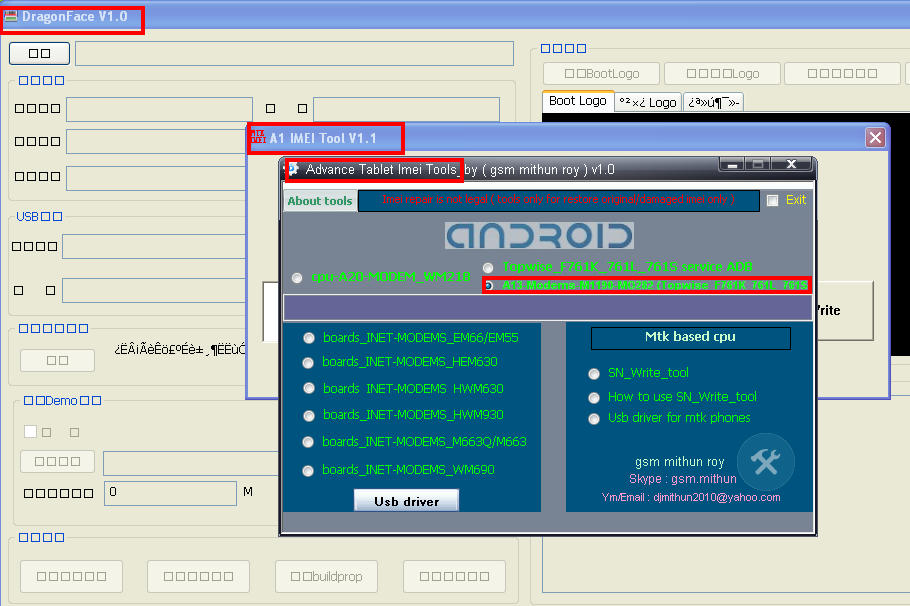
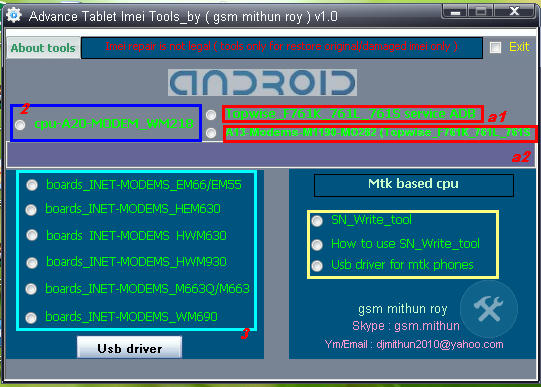
A1 & a2 : Click a1 topwise_F761k_761l_761s service Adb copy or extract Dragonface_v10 folder to desktop > open folder and deagonface.exe,now close advance tablet imei tools and open tool aagin now click a2 a13 modems1190-m0228 (topwise_F761k_761l_761s) then connect tablet and repair


2 : just click and fill the box imei digit press write
3 : click to any tools
according matches su al modem device enter 15 digit imei in cmd tool press enter then restart device and check


Copyright @ 2013 FLASH FILE & SOFTWEAR ZONE.